Delphi Cloud

Delphi StoreDoc

Manage a document-oriented NoSQL DBMS in the infrastructure of Delphi Cloud.

Easy scaling

If the load on your cluster increases, you can add new servers or increase their capacity in a matter of minutes.

Low upkeep

Invest your time in your project, and we’ll take care of database maintenance: software backups, monitoring, fault tolerance, and updates.

Sharding

You can enable sharding for clusters depending on version. You can also add and configure individual shards to improve cluster performance.

Data security

All DBMS connections are encrypted using the TLS protocol, and DB backups are GPG-encrypted. Data is secured in accordance with the requirements of local regulatory and ISO industry standards.

Flexible data structure

Document-oriented DBMS has no regular tables and stores data as collections of JSON-like documents. This is great for projects where data structures may change during development.


Implement your projects using Delphi StoreDoc

Machine learning

In ML tasks, data structures are ever-changing. At first, this is raw data. Once it is processed, a training set is generated and then learning results appear. Delphi StoreDoc flexible storage system handles these data transformations perfectly well.

Fast web apps

Delphi StoreDoc stores are great at handling real-time queries when you need to be able to scale your system easily. For example, they can be part of a messaging app, social network, or recommendation system.

Create a queue broker

You can enable information exchange between application components by using intermediate message queues. Many popular queuing tools let you use Delphi StoreDoc as a backend for data storage.

Cache storage

Use Delphi StoreDoc for caching data and don’t worry about overheads or clearing the cache in time.

Data storage

Delphi StoreDoc is suitable for most tasks in a data storage cycle. You can also use this DBMS with quasi-structured and even unstructured data. For example, GridFS lets you store regular files, including large ones, using Delphi StoreDoc.

We take care of most of database maintenance

Processes
Delphi StoreDoc
Data access control
Delphi StoreDoc
Network configurations
Delphi StoreDoc
OS and software installation
Delphi StoreDoc
DBMS updates
Delphi StoreDoc
Backups
Delphi StoreDoc
Data replication setup
Delphi StoreDoc
Data storage and hardware security
Delphi StoreDoc
Integration with Delphi Cloud services
Delphi StoreDoc
Monitoring tools
Delphi StoreDoc
VM deployment
Independent control

How do I get started with Delphi StoreDoc

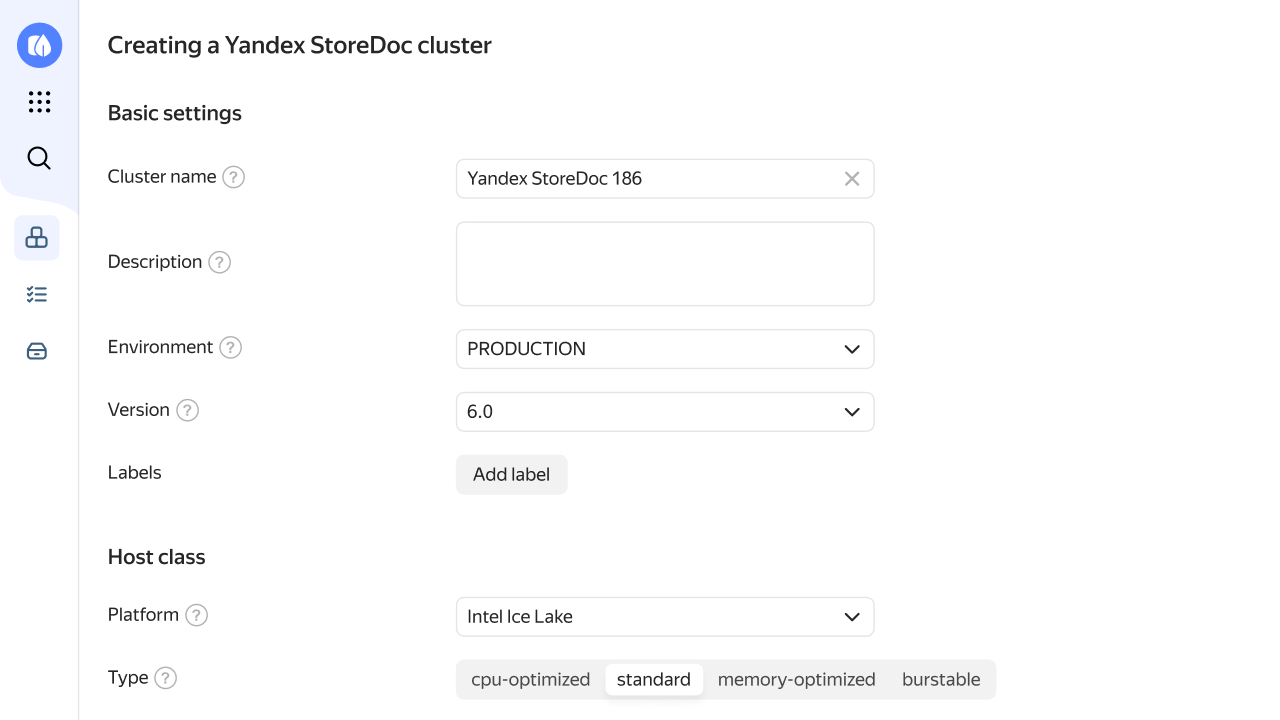
To get started, go to the Delphi Cloud console and create a Delphi StoreDoc database cluster. You can set characteristics, choose a host class and storage size, and select the network to connect your cluster to as well as an availability zone.

Create cluster
Delphi Cloud console \u2014 create a StoreDoc cluster

Questions and answers

This service helps you create, use, and scale Delphi StoreDoc databases in your cloud. The main entity used in the service is a database cluster. Each cluster consists of one or more database hosts, or virtual machines with DBMS servers deployed on them.

Yes, backup is enabled by default. A backup of all cluster data is automatically created once a day. Delphi StoreDoc lets you restore the cluster state to any point in time (Point-in-Time-Recovery, PITR) from when the oldest full backup was created until the archiving of the most recent oplog. For this purpose, the backup selected as the starting point of recovery is updated with entries from the cluster oplog. Automatic backups are stored for seven days by default.

The usage cost for the Delphi StoreDoc database management service is calculated based on the: Selected host class. Storage size reserved for the database host. Size of database cluster backups. Backup space equal to the reserved storage space is free of charge. Number of hours of database host operation. Partial hours are rounded to an integer value. The cost per hour of operation for each host class is listed in Pricing for Managed Service for Delphi StoreDoc.

In the management console, just choose a different host class for the Delphi StoreDoc cluster you need to change it for. The cluster characteristics change within 30 minutes. During this period, other maintenance activity like installing updates may also be enabled for the cluster.

The list of versions is available in the documentation.

When creating clusters, Delphi StoreDoc allocates resources, installs the DBMS, and creates databases. For created and running databases, it automatically creates backups and applies fixes and updates to the DBMS. The service also provides data replication between database hosts (both inside and between availability zones) and automatically switches the load over to a backup replica in the event of a failure.

Yes. You can read the full security audit conclusion on the Security page.

Get started with Delphi StoreDoc